SVG vs PNG: which to use for logos, icons and illustrations
SVG stores shapes and PNG stores pixels, and that decides which one fits a job. We measured five SVGs of very different complexity against PNG copies at four sizes, and traced a logo, a seal and a photo back to SVG.
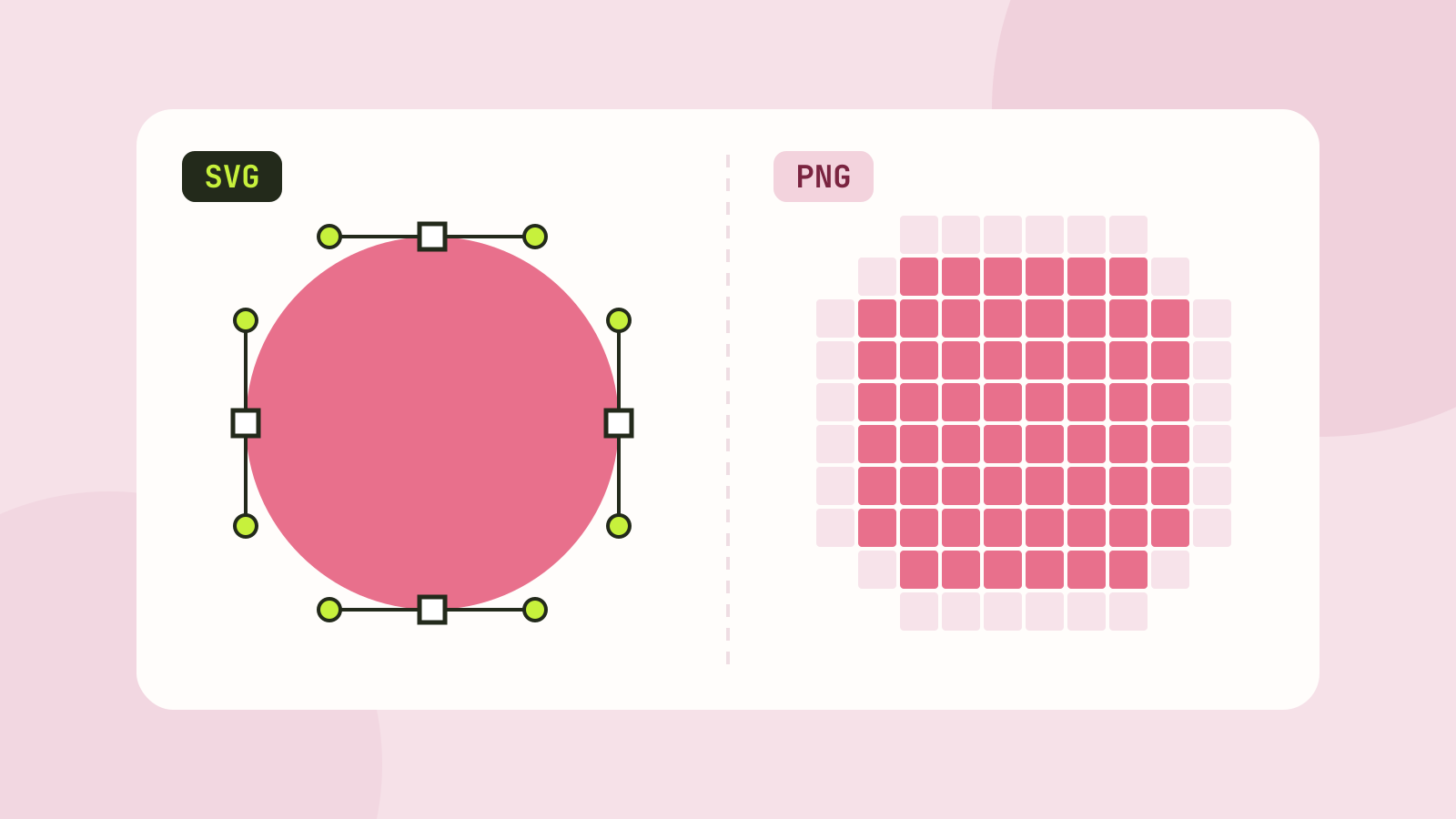
Designers send logos as SVG, websites ask for PNG, and some programs accept only one of them. Both are image formats, but they describe pictures in completely different ways, and that decides which one is right for a job. We measured five SVGs of very different complexity against PNG copies made with our own converter.
Shapes versus pixels
An SVG file is text: a list of shapes such as "a circle here, 3 units across, filled green". The browser or program draws those shapes fresh at whatever size is needed, so the edges are always as sharp as the screen allows. A PNG is a grid of pixels, saved without loss. It looks perfect at its own size and has to be stretched, and blurred, to be shown larger.
That makes SVG the natural format for anything made of shapes: logos, icons, diagrams, charts, maps. Photos are made of millions of slightly different pixels, with no shapes to describe, so they belong in a pixel format such as JPEG, WebP or AVIF, as we tested in JPG, PNG, WebP or AVIF.
The test files
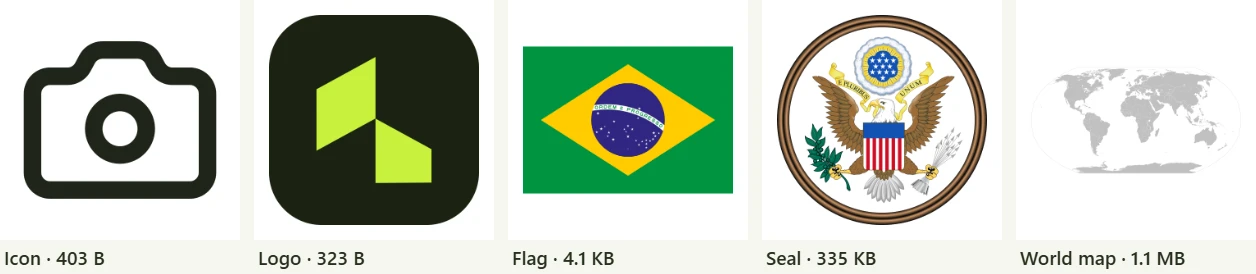
- Icon: a camera from the open source Lucide set, two shapes.
- Logo: the Tooloat logo, three shapes.
- Flag: the flag of Brazil, 17 shapes including lettering.
- Seal: the Great Seal of the United States, a detailed illustration with 776 shapes.
- World map: a blank map of the world with every country as its own shape, 2,316 in all.
The flag, the seal and the map are public domain files from Wikimedia Commons. Each SVG went through our SVG minifier with its default settings and was turned into PNG at four sizes with the SVG to PNG converter.
File sizes
| File | SVG | SVG minified and gzipped | PNG 256 px | PNG 1024 px | PNG 1024 px, optimised |
|---|---|---|---|---|---|
| Icon | 403 B | 261 B | 7.3 KB | 52.2 KB | 23.9 KB |
| Logo | 323 B | 189 B | 6.5 KB | 46.0 KB | 20.6 KB |
| Flag | 4.1 KB | 1.2 KB | 9.7 KB | 60.5 KB | 32.5 KB |
| Seal | 334.5 KB | 61.7 KB | 83.7 KB | 668.2 KB | 436.6 KB |
| World map | 1.05 MB | 341.6 KB | 16.8 KB | 132.0 KB | 55.3 KB |
Compressed, the icon, the logo and the flag were smaller than even a 64 pixel PNG of them, and 50 to 250 times smaller than a 1024 pixel one, while serving every screen size at once. That is why icon sets and logos are distributed as SVG.
The seal and the map show the limit. An SVG grows with the number of shapes, not with the size it is shown at. The seal is still smaller as a compressed SVG than as a 1024 pixel PNG, but the map, with its thousands of detailed coastlines, needs 342 KB even compressed, six times more than an optimised PNG at 1024 pixels. If a complex drawing is always shown at one size, a PNG or a lossless WebP can be the lighter choice.
Sharpness
The size difference matters less than what happens when a picture is shown larger than planned: on a high density phone screen, when someone zooms in, or when a logo made for a website ends up on a poster.


An SVG never has this problem. With a PNG, the answer is to make it at the largest size it will ever be shown, at least twice its normal display size for sharp screens, and accept the larger file.
Turning a PNG into an SVG
If you only have a PNG of your logo, a tracer can rebuild it as shapes. We traced three PNGs with our PNG to SVG converter, using its presets:
- The logo, 512 pixels: 6 shapes in a 1.5 KB SVG that looks like the original. Flat colours and clean edges are what tracing does best.
- The seal, 1024 pixels: 943 shapes and 401 KB, larger than the original SVG and with less detail in the fine lines. Tracing an illustration works, but a real vector original is always better.
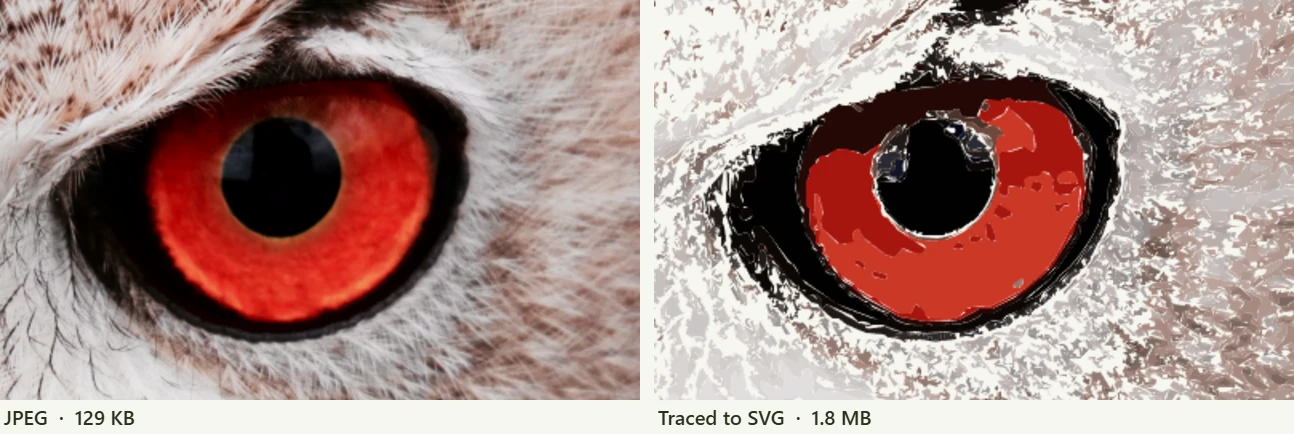
- A photo of an owl, 1000 pixels: 7,039 shapes and 1.8 MB, fourteen times the size of a 129 KB JPEG of the same photo.
Where SVG does not work
- Email. Many email apps, including some of the most popular, do not show SVG images. Use PNG in emails.
- Uploads. Social networks, marketplaces and many forms accept only JPEG, PNG or WebP.
- Untrusted files. SVG can contain scripts, so many sites refuse SVG uploads for security reasons. Our minifier removes scripts and event handlers by default.
- Text without its font. Text in an SVG is drawn with the fonts of the viewer's device unless it was converted to shapes, so a logo can look different elsewhere. Convert lettering to outlines before you share a logo file.
The usual answer is to keep the SVG as the master file and export PNGs from it where a pixel format is required.
Which to use
| Picture | Best format |
|---|---|
| Logos and icons on websites and in apps | SVG |
| Charts, diagrams and simple illustrations | SVG |
| Very detailed drawings shown at one size | PNG or lossless WebP, optimised |
| Screenshots | PNG |
| Photos | JPEG, WebP or AVIF |
| Images in emails and uploads | PNG or JPEG |
All the tools used here work in your browser: the SVG to PNG converter exports any size, the SVG minifier trims files, and the PNG to SVG converter traces logos and drawings.
Questions and answers
Is SVG better than PNG?
For logos, icons and simple graphics, yes: the files are tiny and stay sharp at any size. For photos and very detailed drawings, PNG or another pixel format is usually smaller and better supported.
Why is my SVG file so large?
An SVG grows with the number of shapes and points, not with its display size. Detailed maps and traced images can reach hundreds of kilobytes. Minifying removes editor data and needless decimals; in our test it saved about a quarter on complex files.
Can I convert a PNG to SVG?
Yes, with a tracer, and it works well for flat logos and line art. Photos turn into a posterized picture and a much larger file: our traced photo was fourteen times the size of the JPEG.
Can I use SVG in an email?
Not reliably. Many email apps do not display SVG, so use a PNG made at twice the display size.
Tools in this article
More from the blog
JPG, PNG, WebP or AVIF: which format to use
We saved six photos and a graphic in all four formats at the same visual quality and compared the sizes. The newer formats win on photos by a wide margin, but each format still has a job.
Pixels, DPI and file size: how big does a photo need to be?
Upload forms ask for 300 DPI, print shops for high resolution, and phones save 12 megapixel photos. We tested what the DPI number really does, how file size follows pixel count, and how many pixels each use actually needs.
Which JPEG quality setting should you use?
Every program that saves JPEG asks for a quality from 0 to 100, and the trade between size and quality is far from linear. We saved six photos at twelve settings and measured what each step changes.